What Is Google AI Mode? How It Works and Traffic Impact
Google AI Mode answers searches with a written response and follow-ups. Learn how it works, how it differs from AI Overviews and what it means for traffic.


Updated November 11, 2026

In this article
What is Google AI Mode?
How does Google AI Mode work?
How is Google AI Mode different from AI Overviews?
What did we measure on AI Overviews and ChatGPT?
Show More
Google AI Mode is a way to search Google that answers with a written response instead of a page of links, and lets you ask follow-up questions in the same thread. Google launched it as a Search Labs experiment, opened it to everyone in the US, and later said it had passed one billion monthly users (Google I/O).
The same brand can look very different from one AI surface to the next. On the day we measured, Google's AI Overviews gave Babysense 14.6% of the brand mentions in its answers, second of 18 baby monitor brands. ChatGPT, asked the same 135 buyer questions that day, gave it 6.4%, seventh of the 16 brands it named. AI Mode is a third surface, and it needs its own check.
This page draws on Google's own documentation, as published at the time of writing, and on Footprint's measurement for Babysense (babysensemonitors.com), a Footprint customer that agreed to publish its numbers. The measurement comes from a single day.
Key takeaways
- Google AI Mode answers a search with a written response and links, and lets you ask follow-ups in the same thread.
- It is a separate surface from AI Overviews, and Google says the links the two show will vary.
- Search Console reports impressions for generative AI features, AI Mode included, and lets every site opt out.
- On the day we measured, Babysense held 14.6% of AI Overviews' brand mentions and 6.4% of ChatGPT's. The two were asked different inputs, so treat the gap as a reason to check each surface.
- One approach worth testing is getting onto the third-party pages that AI Mode's hidden sub-searches return.
What is Google AI Mode?
Google AI Mode is a Google Search experience that answers a question with a written response and links to the pages it drew on, then lets you keep asking follow-ups. You type or speak the question. It sits in its own tab in Google Search and in the Google app (Google).
How do you open Google AI Mode?
Google's help page gives these steps (Google Search Help):
- Go to google.com/ai, or go to google.com and tap AI Mode below the search bar. In the Google app, tap AI Mode on the home screen.
- Ask a question with text, voice, images or files.
- Type or speak a follow-up in the same bar to continue the thread.
Google later added the option to ask a follow-up from an AI Overview on the normal results page and continue the conversation in AI Mode (Google I/O).
What can you ask Google AI Mode?
Google says you can ask "with text, voice, images or files," and you can paste a web page address and ask a question about it. When Google has low confidence in an AI response, AI Mode may show a set of web links instead (Google Search Help). Google says people ask AI Mode questions "nearly three times longer than traditional searches" (Google).
When did Google AI Mode launch, and where is it available?
Stage | What Google announced |
|---|---|
Launch | Launch as an experiment in Search Labs, first for Google One AI Premium subscribers (Google) |
US rollout | Rollout to everyone in the US with no Labs sign-up, on a custom version of Gemini 2.5 (Google) |
Global expansion | More than 35 new languages and over 40 new countries and territories, for over 200 in total (Google) |
One billion users | Over one billion monthly users; Gemini 3.5 Flash becomes the default model worldwide (Google) |
AI Mode is free to use. Some newer features launch first for paid Google AI Pro and Ultra subscribers (Google I/O).
How does Google AI Mode work?
AI Mode breaks your question into subtopics, runs several related searches at once and combines what they return into one response. Google calls this query fan-out: "issuing multiple related searches across subtopics and data sources" (Google Search Central).
- The question is split into subtopics.
- Several related searches run at once.
- The results are combined into one written answer with links.
What does query fan-out mean for your pages?
Because fan-out runs searches the searcher never types, a page could be linked for a sub-search it was never targeting. Google says fan-out helps it show "a wider and more diverse set of helpful links" (Google Search Central). Google doesn't publish how it picks those links, so anything more specific is inference.
How is Google AI Mode different from AI Overviews?
Google AI Mode and AI Overviews are both Google features that write an answer and cite pages, and Google says both may use query fan-out. They differ in where they appear (a tab versus the top of the results page), how long the conversation runs (follow-ups versus one search) and which pages they link, which Google says can differ.
| AI Overviews | AI Mode |
|---|---|---|
Where it appears | A summary at the top of the normal results page, links below | Its own tab; the answer is the page |
When it appears | Only when Google's systems judge it "additive to classic Search" (Google Search Central) | When the user chooses AI Mode or follows up from an overview (Google I/O) |
Conversation | Answers one search | Continues with follow-up questions |
Links | Can differ from AI Mode's | Can differ from AI Overviews' |
Google says the two "may use different models and techniques, so the set of responses and links they show will vary" (Google Search Central). A place in an AI Overview doesn't guarantee one in AI Mode, so check each surface separately.
What did we measure on AI Overviews and ChatGPT?
Footprint has no AI Mode data, so this measurement shows why surfaces differ, not how AI Mode behaves.
Do AI Overviews and ChatGPT name the same brands?
In Footprint's measurement for Babysense, we ran 270 Google searches: the 135 keywords Babysense tracks and 135 buyer questions written from that keyword list. 243 of the 270 searches showed an AI Overview, and those 243 overviews named brands 481 times. ChatGPT, with web search on, answered the same 135 questions and named brands 267 times. The two surfaces got different inputs, since Google was also searched for the bare keywords.
Google's AI Overviews named 18 brands and ChatGPT named 16. The shares below are each brand's share of its surface's brand mentions.
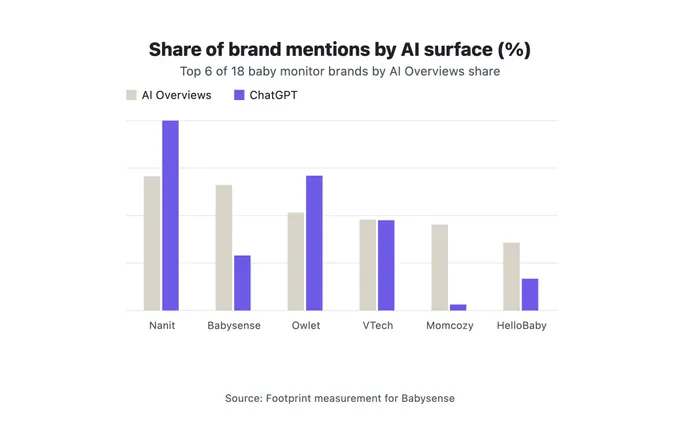
Brand | AI Overviews | ChatGPT |
|---|---|---|
Nanit | 15.6% (75 mentions) | 22.1% (59 mentions) |
Babysense | 14.6% (70 mentions) | 6.4% (17 mentions) |
Momcozy | 10.0% (48 mentions) | 0.7% (2 mentions) |
Babysense was second in AI Overviews, behind Nanit, and seventh on ChatGPT. Momcozy split more sharply: 48 mentions in AI Overviews against 2 on ChatGPT. Our page on Google AI Overviews explains how we measure that surface, and our ChatGPT page does the same for ChatGPT. The full Babysense results are in the Babysense Google AI Overviews story.
Does Google AI Mode reduce traffic to your website?
Not measured for AI Mode itself. No independent study of AI Mode's effect on clicks turned up in our research, and Google counts AI Mode clicks inside your normal Search traffic. The best click evidence is Pew Research Center's study of AI summaries on the regular results page.
How do you see AI Mode traffic in Search Console?
Google counts clicks from its AI features inside your overall Search traffic, in the Performance report under the "Web" search type (Google Search Central). Search Console also has generative AI performance reports, which show "how often URLs from your site appeared in generative AI features in Search and Discover, such as AI Overviews and AI Mode" (Google Search Central Blog).
You can filter those reports by page, country, device and date. They count impressions, not clicks, and Google's announcement describes no separate AI Mode click count.
Do AI answers reduce clicks to your website?
Before AI Mode reached everyone in the US, Pew Research Center tracked the Google browsing of 900 US adults. Across 68,879 searches, 18% showed an AI summary. When one appeared, users clicked a traditional result on 8% of visits, against 15% without one (Pew Research Center).
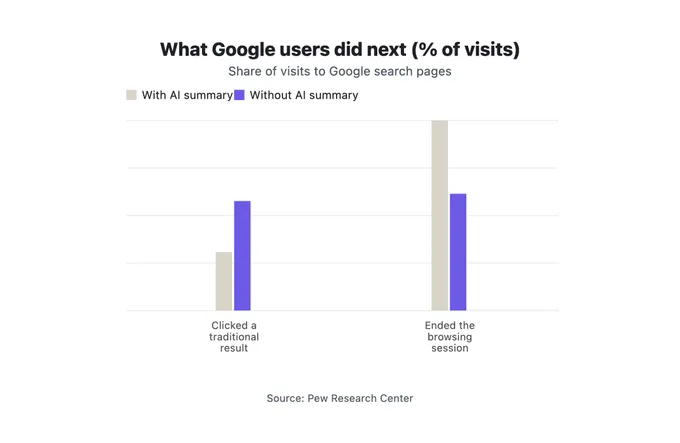
Users also ended their browsing session on 26% of visits with an AI summary, against 16% of visits without one. Pew measured AI summaries on the regular results page, not AI Mode, and it did not measure whether the answer named a brand. A searcher who reads the answer and leaves can never reach your analytics, so whether the answer named you matters. Share of voice, your share of the brand mentions in AI answers, measures that.
Can you control whether AI Mode uses your pages?
Yes. A Search Console setting removes a site from generative AI features altogether, and the existing snippet controls limit what Google shows from a single page.
The Search Console opt-out
Google added a Search Console toggle that lets a site choose whether it appears in, and helps ground responses in, generative AI features such as AI Overviews and AI Mode. Google has rolled it out to all websites worldwide (Google, new controls for website owners).
Opting out has a clear cost: "Sites that opt out will not receive traffic or impressions from our generative AI features."
Snippet controls
To limit what Google shows from a page, Google points to the nosnippet, data-nosnippet, max-snippet and noindex controls (Google Search Central). A page with "nosnippet", or one that isn't indexed, can't be a supporting link.
How do you get your pages into AI Mode answers?
Start with eligibility, check the answers yourself, then consider the pages the sub-searches return. Footprint hasn't measured AI Mode itself, so the last step is a hypothesis built from our ChatGPT data and Google's description of fan-out.
Make sure your pages are eligible
A page must be "indexed and eligible to be shown in Google Search with a snippet." Google adds that "there are no additional technical requirements," no special structured data and no need for AI text files, so you don't need special markup (Google Search Central).
Ask AI Mode your buyers' questions
We suggest writing twenty to thirty questions the way buyers in your market type them; the free prompt generator writes a first list. Ask each one in AI Mode, in line with answer engine optimization (AEO), and log the date and country, since answers can vary by person, place and run. A simple log looks like this:
Question | Named? | Linked pages | Page owner |
|---|---|---|---|
Best baby monitor without a subscription? | Yes or no | Page addresses | Who runs each page |
Our guide on how to measure AI visibility covers the counting. When you evaluate any tool that reports AI Mode, ask whether it measures AI Mode itself or infers it from AI Overviews, how many answers sit behind each percentage, and where its traffic figure comes from.
Test the pages the sub-searches return
From the answers you logged, list every linked page that names a competitor and not you. In Babysense's market, mentions on list-style pages in Google's results had the highest tracked link, +71 on a scale of -100 to +100 (Spearman correlation), with how often ChatGPT named each of 18 tracked brands. Footprint tested 46 activities, and about 5% of them (two or three) would pass by chance. 16 of the 46 passed, so many signals move together here, and YouTube engagement was about as strong (+70). Against AI Overviews share, the same signal was +65 (also significant), which is closer to AI Mode than the ChatGPT figure. These links are tracked, not proven causes, so treat this as a lead worth testing.
If you try it, get onto those pages where they accept outside contributions, through best-of list placements via digital PR or Reddit marketing. Our page on which activities track with AI mentions shows what else we track, and generative engine optimization (GEO) covers the pages other people write about you. For how the disciplines differ, see how AEO, GEO and SEO differ.
What we don't know about Google AI Mode yet
- AI Mode's effect on clicks. We found no independent click study of AI Mode we could verify.
- The overlap between AI Mode and AI Overviews. Google says the links vary, and we found no source that measures by how much.
- Babysense's standing in AI Mode. Our measurement covers AI Overviews and ChatGPT on one day in one category, and answers vary from run to run.
Frequently asked questions
Is Google AI Mode free?
Yes. Google AI Mode is free to use in Search. Some newer features, such as information agents, launch first for paid Google AI Pro and Ultra subscribers (Google I/O).
Is Google AI Mode the same as AI Overviews?
No. Both write an answer and cite pages, but AI Overviews sit at the top of the normal results page and answer one search, while AI Mode is its own tab with follow-ups. Google says the links they show will vary. See the comparison above.
Does Google AI Mode show sources?
Yes. Google says AI Mode links to the pages it drew on, and may show a set of web links instead when it has low confidence in a response (Google Search Help).
Can you opt out of Google AI Mode?
A site can. Search Console has a setting that removes a site from generative AI features, and Google says "sites that opt out will not receive traffic or impressions from our generative AI features" (Google).
Does Footprint measure Google AI Mode?
Not yet. Footprint measures Google AI Overviews for each tracked keyword and asks ChatGPT, Gemini, Claude and Perplexity your buyer questions. Because Google says AI Mode and AI Overviews can show different links, an AI Overviews result is not an AI Mode result.
Check Google AI Mode on its own: AI surfaces ranked Babysense second and seventh
Google AI Mode answers with a written response built from several hidden searches, and Google says its links can differ from AI Overviews'. On the day we measured, AI Overviews ranked Babysense second and ChatGPT ranked it seventh. The two were asked different inputs, so that is a reason to check each surface on its own, not a clean comparison.
Confirm your pages are eligible, ask AI Mode your buyers' questions yourself, and test the third-party pages its sub-searches return. To see how ChatGPT and Gemini treat your brand today, run the free AI visibility checker. For a full measurement of your market, book a demo.
Sources
Pew Research Center, "Google users are less likely to click on links when an AI summary appears in the results", browsing data of 900 US adults.
Footprint methodology (how we measure). Measurement for Babysense, a Footprint customer, of Google AI Overviews and ChatGPT.